


BusWhere for Schools
4.4150.00 Reviews
App Specs
- Version
- 3.2.172
- Updated On
- License
- Free
- Downloads
- 10,000+
- Developer
- BusWhere
- Categories
- Maps & Navigation
- Platform
- Android
Screenshots
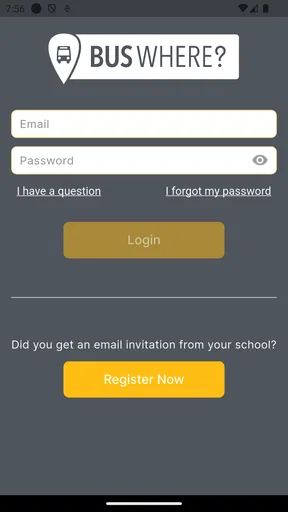
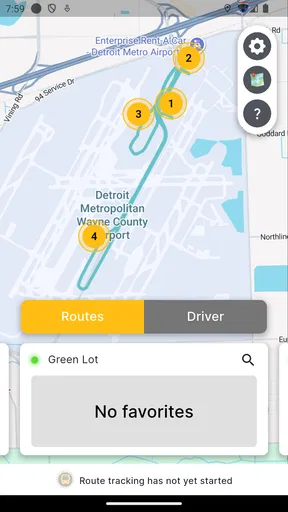
 Analysis by AppCompare
Getting a child to the bus stop on time sounds simple until the morning becomes busy. A delayed breakfast, a forgotten backpack, or a last-minute change can leave a parent wondering whether the bus has already passed. I tested BusWhere for Schools as a focused school-transport tracking app, and I found that its value comes from reducing that particular uncertainty rather than trying to replace a full navigation service. It is free, aimed at everyone, and developed by BusWhere for families and school communities that need a clearer view of a bus journey.
The basic idea is straightforward: use the app to follow a school bus and check its estimated arrival at a stop. That sounds narrow, but the narrow focus is useful. Instead of opening a general map and trying to interpret a moving vehicle, a parent can concentrate on the one question that matters before school: is it time to leave for the stop yet?
How BusWhere fits into a shared household routine
The most convincing use case for me is a household where several people share responsibility for the morning trip. One adult may be preparing breakfast, another may be commuting, and an older child may be getting ready independently. In that situation, the app can act as a common reference point. Whoever checks the bus can tell the others whether there is still time to finish getting ready or whether everyone should head outside.
A realistic routine might look like this: a parent checks the selected stop while a child puts on a coat, then checks again before leaving the house. If the estimated arrival is still comfortably ahead, the family avoids waiting outside unnecessarily. If the bus is approaching, the child knows that the final few minutes matter. I would still treat the estimate as guidance rather than a promise, but that distinction is easy to understand and important in daily use.
This shared-device angle also reveals a practical limitation. A tracking app is only helpful when the people responsible for the journey know where to look and understand which stop is relevant. If one family member checks the wrong stop, an otherwise useful estimate can create confusion. I recommend agreeing on the usual stop and checking its name carefully during setup instead of relying on memory during a rushed morning.
BusWhere is especially suitable when the household wants a simple status check, not a complete family-management system. It does not need to become the center of every conversation. In my experience, it works best as a quick morning tool: open it, confirm the bus position or arrival estimate, and get on with the routine.
Why a school-bus specialist can be easier than a general map
General navigation apps are excellent for driving directions, walking routes, traffic, and public transit in many cities. They are less convenient when the only concern is a particular school bus and its stop. A general map may require searching for a route, identifying the right vehicle, or interpreting several transport options. BusWhere for Schools is more focused, so the mental effort is lower when the school transport information is available through the service.
Worth Reading Before You Choose

Flipboard Shows What News Apps Must Do Beyond the Feed

Switching to Android Auto Means Rethinking Your Driving Routine

Google Calendar Makes a Crowded Week Easier to Manage

Ludo King Makes the Most of the Minutes Between Plans

Baby Panda World Brings Quick Play to Modern Phones, but Its Game Library Feels Busy

ESPN’s Live Game View Makes Following Close Games Easier
That focus is also the main trade-off. I would not use it as my only navigation tool for an unfamiliar city, a weekend trip, or a journey involving trains and regular public buses. A broader mapping app is better for planning a complete route. BusWhere makes more sense as a companion for the school commute, where the route and stop are already part of the family’s routine.
Setting it up without blurring account boundaries
Setup deserves more attention than the short store summary suggests. The important question is not simply whether the app opens, but whether each person using a shared phone can identify the correct school-bus information quickly. I would begin by installing it on the device most likely to be available during the morning, then checking the route and stop details before depending on it for an actual departure.
On a shared device, I prefer a clear boundary between the adult who manages the setup and the child who may only need to view the result. That does not require treating the child as incapable; it simply avoids changing route or stop information accidentally when the phone is passed around. If several adults use the same device, they should agree on who will make any changes and who will only check the current estimate.
Another useful habit is to test the app at a calm time of day. Open the relevant route, identify the stop, and make sure everyone recognizes the same location. Doing this before a school morning prevents the common mistake of trying to learn the interface while the bus may already be nearby. It also gives the family a chance to decide whether the stop shown in the app matches the physical place where the child waits.
I would not assume that installing the app automatically solves every access issue. The school-bus information has to be meaningful for the particular household and route. If the app does not present the expected information after installation, the problem may be related to the route or service connection rather than the phone itself. That is a good reason to check everything before making it part of a daily schedule.
The current version is 3.2.172, and the app supports devices running Android 7.0 or later. That makes it practical for many older Android phones that a family may keep as a shared household device. I would still update the app when an update is offered and avoid testing an old spare phone for the first time on an important school morning.
What I would prepare before relying on it
- Choose one primary checking device so the family knows where the latest view will be available.
- Confirm the intended route and stop while there is no time pressure.
- Show every regular user how to recognize the correct stop before the phone is handed over.
- Keep a simple backup plan for mornings when the phone, connection, or app is unavailable.
That last point matters because live tracking should support a routine, not become the only thing holding it together. A child should still know the normal departure time and where to wait. An adult should still have a basic understanding of the route. The app is most useful when it adds timely information to an already familiar plan.
Using arrival information to coordinate better
The strongest feature in practical terms is the ability to view an estimated arrival at a stop. I found that this changes the timing of a household conversation. Instead of saying “the bus should be coming soon” based on guesswork, one person can check the current estimate and give the others a more informed instruction: finish packing, put on shoes, or leave now.
That can be particularly helpful when different people leave the house at different speeds. A younger child may need an adult to walk to the stop, while an older student may be able to go alone. The adult can use the estimate to decide when to supervise the walk without forcing the child to wait outside for a long period. The app does not replace judgment, but it can make that judgment less speculative.
For shared use, I recommend speaking in concrete terms rather than forwarding a vague message. “The bus is approaching our usual stop” is more useful than “check the app.” If one adult is at work and another is at home, the person with the app open can communicate the timing directly. This avoids making a child responsible for interpreting a screen during a rushed transition.
There is also a useful evening-before role, although I would not treat the app as a substitute for checking school notices. A family can use it to refresh its memory about the normal stop and route, then use the live view in the morning. The important distinction is between routine tracking and official changes. If a school announces a temporary change, that announcement should take priority over assumptions based on a familiar route.
One non-obvious benefit is that tracking can help families decide when not to hurry. Parents sometimes send children outside early because they are afraid of missing the bus. That creates its own problems, especially in bad weather or when a young child is waiting without close supervision. An arrival estimate can support a more measured departure, provided the family allows a buffer and remembers that live estimates can change.
Where estimates need human judgment
An estimated arrival is not the same as a guaranteed pickup. Traffic, loading time, weather, road conditions, or a change in the bus’s progress can affect what happens next. I would never tell a child to run toward a stop because the screen suggests only a short amount of time remains. The safer approach is to leave with enough margin and use the app to improve awareness, not to encourage risky rushing.
The app also cannot decide whether a child should travel alone, wait with an adult, or return home if the bus does not appear. Those are household decisions shaped by age, maturity, local conditions, and school rules. BusWhere can provide transport timing, but it should not be mistaken for supervision or a substitute for an agreed safety plan.
For that reason, I would create a simple response plan before using the app daily. Decide what the child should do if the estimate changes suddenly, if the bus passes without stopping, or if the phone cannot display the route. Keeping those decisions outside the app is not a weakness of this particular product; it is a sensible boundary for any tracking tool.
Age, trust, and the role of the child
BusWhere carries an Everyone content rating, which fits its practical purpose and makes it approachable for a household device. That rating should not be confused with a recommendation that every child manage transportation independently. The app may be suitable for a child to view with guidance, while the adult remains responsible for deciding how much independence is appropriate.
I like the idea of teaching an older child to check the bus status, but I would introduce that responsibility gradually. At first, the child can look at the screen while an adult confirms the stop and timing. Later, the child may be able to use the information as one part of the morning routine. The trust comes from repeated understanding of the route, not simply from handing over the phone.
Shared-device use also raises a small but important privacy habit: each person should know what they are viewing and why. A child does not need access to every household conversation or every device setting just to see a bus estimate. If the phone is used by multiple family members, keeping the app’s purpose clear helps prevent accidental changes and reduces unnecessary confusion.
I would also avoid presenting the tracker as a way to watch a child continuously. Its useful role is transportation coordination: knowing whether the school bus is near a stop and adjusting the departure routine. That narrower framing is healthier and more realistic. It encourages communication between adults and children instead of suggesting that an app can replace trust, check-ins, or common sense.
For a family with very young children, the app is more valuable to the supervising adult than to the child. For a teenager who already knows the route, it can become a convenient self-management aid. For a student who travels by several types of public transport, it may be too limited on its own. In that case, a general navigation app should handle the wider journey while BusWhere remains relevant only to the school-bus segment.
What the app is like as a long-term choice
BusWhere has a 4.4 average from around five hundred ratings, with more than a hundred written reviews, and it has passed ten thousand installs. Those figures suggest that it has found a real audience, although they do not guarantee that it will fit every school route or household. I read that level of adoption as encouraging for a specialized app, but I would still judge it by whether the local bus information is useful and dependable in everyday practice.
Its free price removes an obvious barrier for families who only need school-bus tracking. That is important because paying for a full navigation subscription would feel excessive for such a focused task. The free model also makes it easier to put the app on an older household phone rather than buying a dedicated device. I would still consider the cost of attention: if the app requires repeated checking or causes more uncertainty than it removes, free does not automatically mean worthwhile.
The developer is BusWhere, and the product’s identity remains clear throughout my assessment: it is a school-transport companion, not a universal map. That specialization is its best quality and its clearest limitation. When the need is “Where is the school bus, and when might it reach our stop?”, the focused design is easier to understand than a broad collection of transport tools. When the need expands to route planning, walking directions, transfers, or travel outside the school commute, another app will usually be better.
I would recommend it to parents who regularly adjust morning timing, households that share responsibility for getting children to the stop, and older students who are ready to take a small part in managing their commute. I would be more cautious for anyone expecting guaranteed arrival times, automated supervision, or a complete family safety platform. Those expectations go beyond what a bus-tracking tool should be asked to provide.
My household verdict
After using it as a practical school-transport aid, I see BusWhere for Schools as a useful solution to a very specific daily problem. It can make shared mornings calmer by giving adults and children a common view of the bus’s progress and the estimated timing at a stop. The biggest gains come from using it deliberately: confirm the route first, agree on who manages the setup, keep a buffer, and maintain a backup plan.
I would install it for a household that wants a free, focused way to coordinate school-bus departures and that understands the difference between an estimate and a guarantee. I would skip it as a standalone choice if the family needs broad navigation, detailed multi-stage journey planning, or a substitute for adult supervision. Used within its proper boundaries, though, it earns a place in the morning routine because it replaces some guesswork with information while leaving the important decisions where they belong: with the people responsible for the child.
Pros
- Real-time bus tracking helps families plan pickups and drop-offs.
- Parents can receive useful arrival and delay notifications.
- School-specific access keeps transportation information private.
- Simple map view makes it easy to follow a bus route.
- Supports better communication between schools and families.
Cons
- Availability depends on the school using compatible BusWhere services.
- Location updates may be delayed by weak mobile or GPS signals.
- Some features may require an invitation or school-provided login.
- Notification settings can be confusing for first-time users.
- Battery and mobile data use may increase during frequent tracking.
FAQs for BusWhere for Schools
What is BusWhere for Schools and who is it designed for?
BusWhere for Schools is a school transportation management app designed to help schools, districts, transportation departments, drivers, and families coordinate student bus services. Depending on the school’s setup, it can provide route information, vehicle locations, pickup details, and communication tools. Access is usually connected to a participating school or district, so it may not be useful as a standalone app without an active account or invitation.
Can parents track a school bus in real time with BusWhere for Schools?
In supported school districts, parents and guardians can use BusWhere for Schools to view a bus’s current or approximate location and monitor its progress along an assigned route. The exact tracking experience depends on the transportation provider, GPS availability, and the permissions configured by the school. Location updates may occasionally be delayed because of weak connectivity, device issues, route changes, or temporary service interruptions.
How do I log in or connect my child’s transportation information?
You generally need credentials, an invitation, or identifying information supplied by your school district or transportation department. After installing the app, follow the organization’s enrollment instructions and enter the requested details carefully. If your child, route, or bus does not appear, contact the school or transportation office rather than creating multiple accounts. The district controls eligibility and must correct inaccurate student or route information.
Does BusWhere for Schools send notifications about bus arrivals or delays?
The app may provide alerts related to estimated arrivals, route progress, delays, schedule changes, or other transportation announcements, depending on the features enabled by the school. Notifications require permission in your phone’s settings and may also depend on accurate contact information in the district’s records. Because alerts are not guaranteed during technical or network problems, families should continue following the school’s official communication procedures.
Is BusWhere for Schools free, and is it available on Android and iPhone?
For families, BusWhere for Schools is typically available to download without a separate subscription when their school or district participates in the service. However, availability, included features, and account access can vary by organization. The app may be offered for both Android and iOS, but supported versions and device requirements can change. Check the relevant app store listing and your school’s instructions before downloading.


